Motus
CCTV evidence motion extractor
Load CCTV footage from one camera, let Motus find the motion, keep what matters, and export an evidence log with the clips. Hours of empty footage become a short list of events you can actually review.
What Motus does
Built for the job investigators actually do with CCTV: find the movement, prove the time, hand over something a court can follow.
Finds the motion for you
Scanning starts as soon as footage is imported. Three detection algorithms — MOG2, KNN for slow or subtle movement, and a fast frame-difference mode — with scan presets from Fast to Full Motion Detect.
Area of interest
Drag a box on the video to detect motion only where it matters — one doorway, one till, one stretch of footpath — and ignore the tree line moving in the wind.
Fast event review
Every event is a row you can play, label, tick and star. Frame-step, change speed and jump between events entirely from the keyboard.
True-time calibration
CCTV clocks drift. Record the offset between the CCTV clock and real time once, and every exported event carries both the on-screen time and the real time it happened.
Evidence log + clips
Export a CSV log — camera, address, sensitivity, algorithm, offset, then every event with its frames, video times and real times — alongside the clips at the resolution you choose.
Originals are never touched
Source footage is treated as evidence. Motus only ever reads it; everything it produces is written to new files you choose.
Import that checks itself
Drag footage in and Motus flags unreadable or awkward files before you waste time on them, spots duplicates, and reads start times from filenames where it can.
Stop and come back
Save the report and reopen it later with your events, labels and calibration intact — so a long job can span shifts.
Made for real machines
GPU-accelerated decoding where the hardware allows, a dark or light theme, and a one- or two-window layout that suits a dual-monitor desk.
How it works
Four steps, in the order you'd do them anyway.
- ImportAdd the footage from one camera. Scanning for motion starts by itself.
- ReviewMotion appears as a list of events. Play each one, tick what matters, star the highlights, label them.
- Set the true timeEnter the clip start times and the offset between the CCTV clock and real time.
- ExportA CSV evidence log plus the clips, at the resolution you pick.
Keyboard and mouse
The playback keys work anywhere in the app, not just on the video — so you can keep reviewing while the cursor is over the event list. Typing in a field keeps its own keys.
Playback
- Space
- Play / pause
- ← →
- Step one frame back / forward
- ↑ ↓
- Faster / slower playback
- , .
- Previous / next event
While reviewing
- N P
- Next / previous event, without reaching for the comma keys
- Del ⌫
- Delete the event you are on
Mouse on the video
- Scroll up
- Zoom in, up to 8×, centred on the pointer — so you zoom straight into a face or a number plate rather than the middle of the frame
- Scroll down
- Zoom back out; at 1× the view snaps back to the whole frame
- Drag
- Zoomed in, drag to pan around the frame. At normal zoom, drag to draw the area of interest
- Right-click
- Reset the view — back to the full frame at 1×
The time offset, before you even open Motus
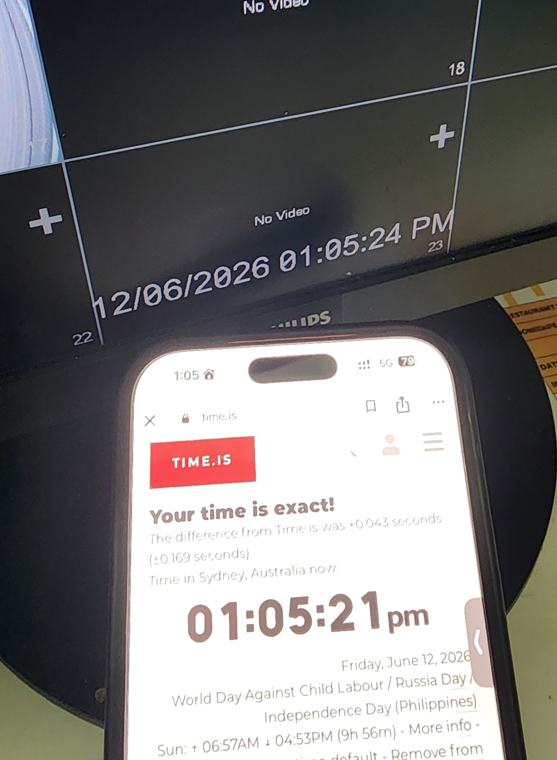
The way investigators have always done it: photograph a known-accurate clock next to the CCTV screen, so one picture holds both times. The CCTV Tool on this site gives you that clock — synced to this server, not to your phone — and works out the offset and the real time of an incident for you.
CCTV Tool
Exact time, clock-offset calculator and incident-time converter. Works in any phone browser — nothing to install.
Download
Motus is a single Windows application — no installer, no account, no licence key.
Motus for Windows
| Requirements | Windows 10 or 11, 64-bit. No admin rights needed. |
|---|---|
| Install | Unzip and run Motus.exe. Nothing is written to Program Files;
settings and logs live in %APPDATA%\Motus. |
| First run | Windows may show a SmartScreen warning for a new publisher — choose More info ▸ Run anyway. Check the SHA-256 above against the file if you want to be certain it is the build published here. |
| Support | joel@w3dev.com.au |